Report a web accessibility barrier.
Cal State Los Angeles is committed to providing an inclusive and accessible digital environment for all members of our campus community. ITS Accessibility Services offers tools, resources, and hands-on support to help departments ensure their websites, documents, media, and events meet accessibility standards. We encourage all content owners, web editors, faculty, and staff to review the services below and take action now to ensure their digital content is accessible and compliant.
Update
PDF Accessibility Remediation App
To support the campus community in creating accessible instructional materials more efficiently, Accessible Technology Services (ATS) offers the PDF Accessibility Remediation App. This self-service tool allows users to upload one or more PDF files for automated accessibility processing and receive a detailed report of any issues that require manual review.
How It Works
- Upload a document: Once you are logged in to the PDF Accessibility Remediaton App, simply upload PDF files for remediation.
- Remediation: An automated approach is used to fix common accessibility issues like missing tags, incorrect reading order, alt text and more.
- Download your accessible PDF: Within a short time, you’ll receive your processed PDF and accessibility reports ready to share.
*This pdf remediation solution does not fix fillable forms. In addition, you will need to conduct a manual check for color contrast and logical reading order.
Important Notes
- Files must meet the upload requirements (file size, page limits) specified within the app.
- The app is designed to supplement remediation. It improves accessibility but does not guarantee full remediation. Some complex issues still require manual review and all files should be verified for accessibility before use in instruction.
Best Practices Before Uploading
- Start with the original source file (Word, PowerPoint, etc.) and apply accessibility best practices before converting to PDF.
- Ensure headings, alt text, color contrast, and table structures are correctly applied prior to conversion.
- Use the app after these initial steps to streamline your final remediation process.
- For step-by-step instructions, visit the Using the PDF Remediation App Guide.
In addition to using the PDF Accessibility Remediation App, faculty and staff may also submit files for manual remediation through the Accessible Technology Services (ATS) request form. This option is ideal for complex or high-priority documents that require detailed review and formatting adjustments to meet accessibility standards.
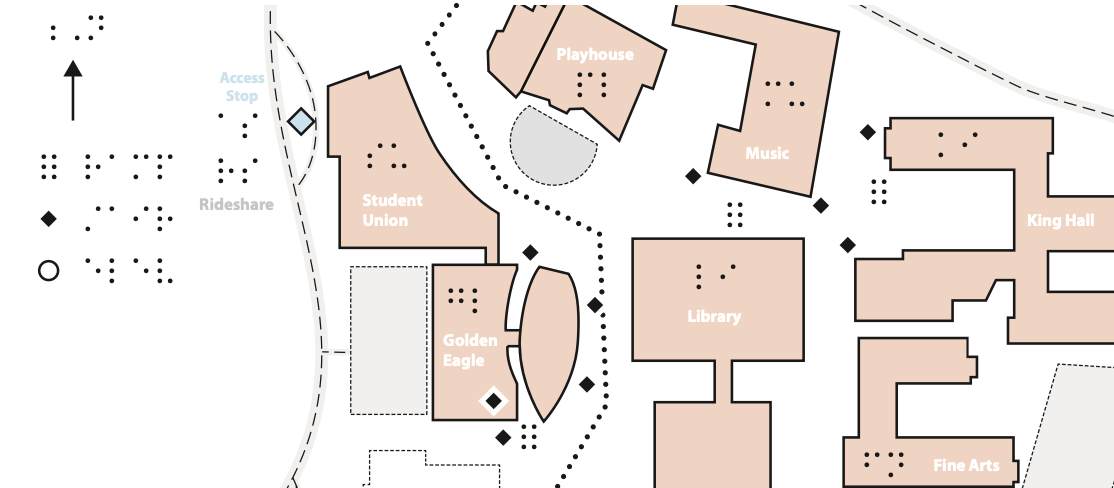
Cal State Los Angeles Braille Tactile Map Available Now!
Over several months, we have worked with various stakeholders to produce a Cal State LA braille tactile campus map. We are pleased to distribute our first version.
We continually optimize our braille tactile map and welcome comments and suggestions via email for inclusion in our next production version. Note that a braille tactile map of the Cal State Los Angeles Transit Center is currently underway.
Copies of the braille tactile map are available at various locations across campus:
- Office to Students with Disabilities
- ITS HelpDesk
- Bookstore
- Library Service Desk
For Orientation and Mobility Specialists, we have made our braille tactile map digital production file available to download. The entire map spans three 11x17 pages in landscape orientation. The map includes braille orientation points between the pages for continuity and plaintext to orient sighted users who may be assisting non-sighted individuals. Further, note that color contrast is purposefully low to facilitate correct production via thermal fuse machines (dark and black images rise on swell touch paper).
Faculty & Staff: Submit Your Documents for Accessibility Remediation.
PDFs, Word, Excel, PowerPoint, course content, or documents for any other purpose; send your digital content to ITS Accessibility for remediation. With a few clicks, you will ensure your digital content is accessible to all; we do all the hard work for you. Visit the ITS Accessibility Document Remediation Webpage to Submit Documents.
PopeTech Enterprise-Wide Web Accessibility Scanning Tool
If you have been recently tasked with updating your department, division, or college website, you'll need an account in our new enterprise web accessibility scanning tool. Our new user-friendly tool helps Drupal content editors identify and address accessibility issues on their web pages; the errors are only pertinent to the content that Drupal content editors can affect, so the information is clear and concise. Reach out for account access now.
Accessible fonts are now installed on all campus computers
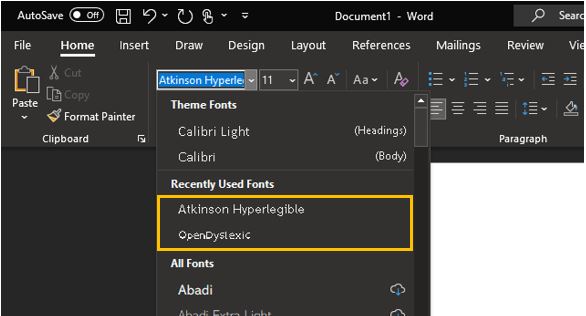
Two accessible fonts are now included in the campus baseline image for Macs and PCs to assist individuals with low vision or dysgraphia. The Atkinson Hyperlegible and OpenDyslexic fonts are designed to make character recognition easier for individuals with low vision and dysgraphia.
The Atkinson Hyperlegible font uses slightly exaggerated forms for letter shapes to allow distinctions between similar letters more efficiently by ensuring all characters have more unique characteristics.
The OpenDyslexic font is designed to help some common symptoms of dyslexia by weighting the font at the bottom to counteract flipping and assist with reading comprehension.
To begin using these fonts, look in the font drop-down of your favorite application and choose either Atkinsoon Hyperlegible or OpenDyslexic. Fonts are typically listed alphabetically by the first letter.