
Congratulations on your admission to Cal State LA!
Follow the steps below to pay your deposit and confirm your plans to attend.
Before You Start: Activate Your MyCalStateLA ID
Already activated it? Skip to Step 1: Open Transact Payments.
- Go to id.calstatela.edu.
- Enter the PIN and CIN sent to you in separate emails from [email protected].
- Sign up for Multi-Factor Authentication (MFA). You’ll use your phone or another device to confirm your identity when you sign in.
Once your account is set up, you can access the MyCalStateLA portal.
Step 1: Open Transact Payments
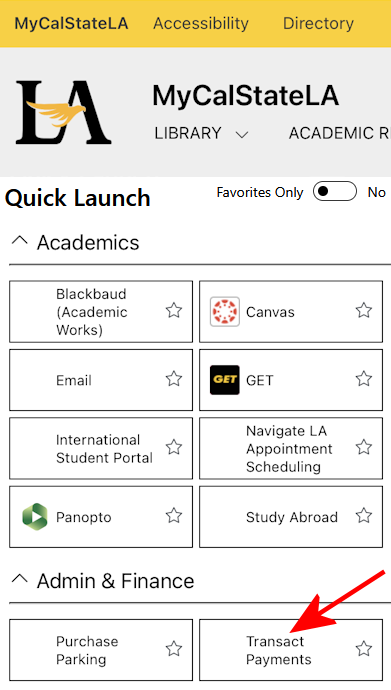
- Log in to the MyCalStateLA portal.
- Under Quick Launch, select Admin & Finance.
- Click Transact Payments.
Step 2: Pay Your Deposit
- Find the Enrollment Confirmation Deposit (ECD) for your admission term.
- Add it to your cart and follow the prompts to pay.
- Save your payment confirmation for your records.
By paying your Enrollment Confirmation Deposit (ECD), you’re saying "YES" to Cal State LA and confirming your plans to attend the university. The deposit is nonrefundable and will be applied toward your tuition and fees for your admission term.
Transact is available 24/7 and accepts electronic checks, credit and debit cards, 529 savings plans, and international payments. Payments made after 9 p.m. or on weekends or holidays will post the next business day. Visit One Stop Payment Information for more details.
The ECD is not required for current or continuing Cal State LA students, or for new graduate, certificate, or credential students in state-supported programs. Students admitted to a program through the