We will continue to update this page as we gather questions and concerns.
Please contact [email protected] if you require further support.
General CHRS
The Common Human Resources System (CHRS) is a single employment system for all 22 campuses in the California State University (CSU) system.
Yes and no. CHRS Recruiting is part of CHRS (Common Human Resources System), which includes both the consolidated PeopleSoft system (CHRS) and the CHRS Recruiting system, built within PageUp. CHRS Recruiting was the first module of CHRS to be implemented. When we refer to CHRS, we are referring to the PeopleSoft system. We will always say CHRS Recruiting when referring to PageUp.
- CHRS Recruiting is the first piece of the Common Human Resources System
- Although built on a different platform (PageUp vs. PeopleSoft), it is part of CHRS because it is common to all CSU campuses
- CHRS Recruiting is one module focused on attracting, hiring, and onboarding new employees
- CHRS Recruiting has already been implemented on our campus and only affects those involved in recruiting or hiring
- CHRS is a much larger implementation that will affect nearly all staff and faculty
The Chancellor's Office requires all CSU campuses to make this change. Moving to a consolidated environment will ensure consistency in process and reporting between campuses and will also allow the Chancellor's Office to pull data directly from the system instead of asking every campus to submit the information. Once all campuses are in the consolidated environment, we anticipate financial savings due to the reduced number of databases the system pays for, and reduced expense when doing upgrades to the system.
To start, our current PeopleSoft 9.0 environment is no longer supported. With CHRS, we will be upgrading to the latest cloud-based technology. This new system includes custom modifications specifically designed for the CSU. By transitioning all campuses to a unified environment, we will ensure consistent processes and reporting across the system, while enabling the Chancellor's Office to access data directly. Once all campuses are integrated into the consolidated environment, we expect to achieve financial savings on maintenance and upgrades by reducing the number of databases across the CSU.
CHRS was created by the Chancellor's Office (CO) with guidance from experts across CSU campuses. The Cal State LA implementation team, in close collaboration with CO support, is spearheading the effort to ensure a smooth and successful rollout.
- Terri Tibbs, Campus HR Sponsor
- Berhanu Tadesse, Campus IT Sponsor
- Elizabeth Heise, Campus Academic Sponsor
- Annemarie Norton Chin, Project Manager
- Adriana Machuca Parra, Change Manager
Employee Self Service
- You will get a new CHRS ID, however you will retain your existing campus ID
- Personal information changes will be entered online instead of paper form submission
- Benefits will be managed online
Time Reporting
- Payroll balances post after the 5th business day of the month
- Absences should be entered as they occur or sooner
- No Leave Taken is no longer required
- Hourly timesheet entries should be entered daily, and weekly at the latest
- CTO, ADO, and Overtime are entered directly in Timesheet and not Absences
- Shift Differential is entered in Timesheet vs. paper form submission
Logging In/Access
- Clear your internet browser cache
- Close all your browsers
- Log into my.CalStateLA.edu
- Click on the HRM (CHRS) tile
If you are missing access to specific pages, make sure that you have submitted the CHRS Access Request form through ServiceNow.
If you are still missing access, contact [email protected]
Contact [email protected].
Self Service
- Click on the "Details" link to view your balances
- Within the "Details" page, you will see your available balance types (e.g. vacation, sick, etc.)
- For step-by-step instructions, visit the Knowledge Base: View Your Absence Balances
- If balances are not accurate, email [email protected]
Currently, only absence requests within 90 days of the current date are displayed. To view absence requests outside of this interval:
- Click Edit.
- Adjust the dates to search, then click Done.
Academic Temporary Employees can view and download their Temporary Academic Employment (TAE) appointment notice through Employee Self-Service in CHRS.
- Step 1: Clear your internet browser cache and close all browser windows before logging in. This ensures you are accessing the most current version of CHRS.
- Step 2: Log into myCalStateLA Portal at my.calstatela.edu.
- Step 3: Under the Admin & Finance section, select the HRM (CHRS) tile.
- Step 4: If prompted with the CSU Login screen, select Los Angeles.
- Step 5: From the Employee Self-Service homepage, select the CSU TAE Appt Notice tile to view your appointment notice.
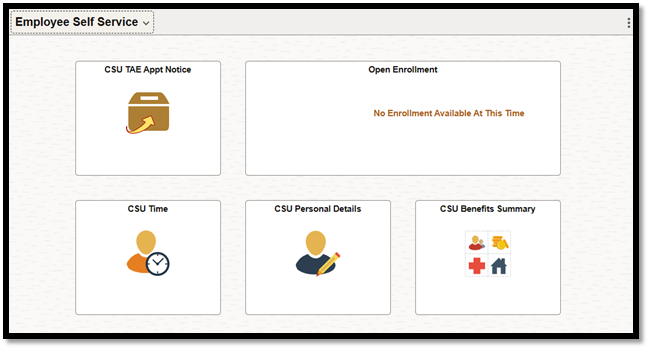
- Step 6: Review the appointment details.
- Please allow pop-ups for the CHRS website in your browser.


- Step 7: Select Review Appt Notice to open your appointment notice.
- You must review the appointment notice before you can acknowledge it.
- Step 8: After reviewing the notice, check off the Acknowledge box to complete the process.

Additional Information
- Course assignments are not included in the appointment notice. For steps to view course assignments, go to View your course assignments.
- ⚠️ Important: If your appointment notice does not open after selecting Review Appt Notice, your browser is likely blocking pop-ups. Please allow pop-ups for the CHRS website, then select Review Appt Notice again. If the PDF still does not appear, check your Downloads folder, as it may have downloaded automatically.
- Tip: For the best experience, use Google Chrome or Microsoft Edge when accessing your appointment notice.
For additional instructions, please visit the View Your Appointment Notification guide in the CHRS Knowledge Base.