

Information Technology Services (ITS) provides anytime, anywhere access to the Cal State LA network through a secure virtual private network. VPN services provide students, faculty and staff access to university network resources from any off-campus computer connected to the internet.
Before attempting to connect to the campus network through VPN, please consider the following:
- We strongly suggest using up-to-date antivirus software on your off-site computer in order to protect your off-site computer and our campus network.
- While connected to the campus, all of the network data you generate from your off-site computer will pass through the campus network infrastructure.
Please use the instructions below to connect to the campus network through the VPN. If you have questions or need assistance installing or using the Cal State LA VPN, please call the ITS Help Desk at 323-343-6170.
Connect Using a Desktop or Laptop Computer
- Navigate to the MyStudent VPN Portal.
- When prompted, log in with your MyCalStateLA ID email address and password.
- Download and install the appropriate version of the GlobalProtect client software.
- Run the GlobalProtect application. The Icon will be located top right for MacOS, and the bottom right for Window users.
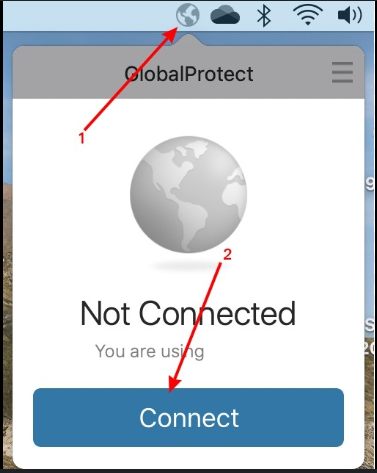
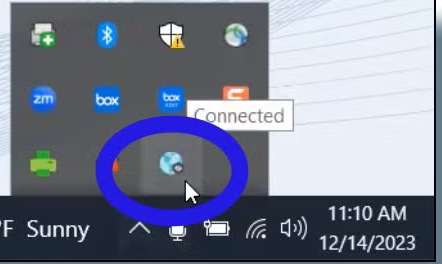
- Select the Home tab. In the section labeled Portal, type: mystudentvpn.calstatela.edu
- Click Connect.
- When prompted, log in with your MyCalStateLA ID email address and password.
Steps 1-3 are only required for the initial setup. The login information entered into the GlobalProtect application is saved and used for all subsequent logins.
Connect Using a Phone or Tablet
- Open the app store of your mobile service provider (Apple App Store / Google Play).
- Search for and download the GlobalProtect app by Palo Alto Networks.
- Run the GlobalProtect application.
- In the section labeled Portal, type: mystudentvpn.calstatela.edu
- When prompted, log in with your MyCalStateLA ID email address and password.
- Click Connect.
Steps 1-2 are only required for the initial setup. The login information entered into the GlobalProtect application is saved and used for all subsequent logins.
Connect Using a Desktop or Laptop Computer
- Navigate to the MyWork VPN Portal.
- When prompted for a username and password, log in with your MyCalStateLA ID username (not email address).
- Download and install the appropriate version of the GlobalProtect client software.
- Run the GlobalProtect application. The Icon will be located top right for MacOS, and the bottom right for Window users.
- Select the Home tab. In the section labeled Portal, type: mywork.calstatela.edu
- Click Connect.
- When prompted for a username and password, log in with your MyCalStateLA ID username (not email address).
Steps 1-3 are only required for the initial setup. The login information entered into the GlobalProtect application is saved and used for all subsequent logins.
Connect Using a Phone or Tablet
- Open the app store of your mobile service provider (Apple App Store / Google Play).
- Search for and download the GlobalProtect app by Palo Alto Networks.
- Run the GlobalProtect application.
- In the section labeled Portal, type: mywork.calstatela.edu
- Log in with your MyCalstateLA ID username (not email address).
- Click Connect.
Steps 1-2 are only required for the initial setup. The login information entered into the GlobalProtect application is saved and used for all subsequent logins.
How Do I Update the VPN Portal Address
To update the campus VPN portal address from MyVPN to MyWork:
- Open the GlobalProtect VPN on your computer.
- In the menu located at top right corner of the GlobalProtect window, click Settings.
- Windows users, click the Manage Portals tab. MacOS users, click Connections.
- Enter MyWork.calstatela.edu for the new portal address.
- Close the settings menu and GlobalProtect window.
How Do I Connect to MyWork VPN After Updating the Portal Address
If you do not use Microsoft Authenticator to authenticate your Cal State LA account, it is recommended you install Microsoft Authenticator on your smartphone. For instructions, please visit the Set up Microsoft Authenticator guide.
To connect to MyWork VPN after updating the portal address:
- Open the GlobalProtect app.
- Select the MyWork.calstatela.edu portal address, then click Connect.
- The MyCalStateLA Portal login window will open.
- Enter your Cal State LA email then click Next.
- Enter your password then click Sign in.
- If you have Microsoft Authenticator set up for your MyCalStateLA account, you will be prompted to authenticate via the app. Otherwise, you will be asked to provide a phone number to receive a verification code. Please use the same phone number that you use for Duo MFA.
- If prompted, select your MyCalStateLA account.
- You are now connected to the campus network with the MyWork VPN.
Note: Microsoft will soon discontinue support for text message and phone call verification methods. It is important to install and set up Microsoft Authenticator as your verification method for Microsoft MFA.